|
Security Code
|   |
|
Security Code
| |
CVV2 and CVC Security Code Explanation
CVV2/CVC is a three or four digit security code imprinted on credit cards to help merchants verify that the customer has a legitimate card in hand at the time of the order.
The merchant asks the customer for the security code and then sends it to the card issuer as part of the authorization request. The card issuer checks the security code to determine its validity, then sends a result back to the merchant along with the authorization.
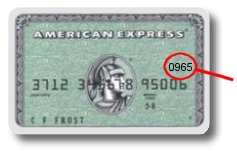
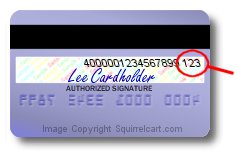
Please see the images below for examples of security codes:
|
|
Card Verification Code for Visa, Mastercard, and Discover |
|
|
Card Verification Code for American Express |
Security Code Settings
There are 2 fields that control your security code settings on your Store Settings page. They are within the "Security Settings" section, and are "Collect CVV2/CVC" and "CVV2/CVC is Required".

Collect CVV2/CVC
- if checked, the cart will prompt the customer for their CVV2/CVC code.
CVV2/CVC is Required
- this forces the customer to enter their CVV2/CVC code in order to submit an order.
Payment Gateway Interaction
While Squirrelcart will allow you to collect the security code when using any of our supported Payment Gateways, not all of the modules will pass the security code to the payment gateway. As of this writing, our implementation of the payment gateways below will pass the security code to the gateway:
2Checkout
Authorize.net
LinkPoint
USAePay