|
Emailing Credit Card Info
|   |
|
Emailing Credit Card Info
| |
This feature gives merchants that have a credit card terminal the ability to process their payments using those terminals, without having to have access to a payment gateway.
Security Precautions
Using this feature is not recommended. We have provided it because so many customer's asked us for it. Security is a big concern when purchasing on the Internet, and the best way to secure transactions is via the use of SSL and a Payment Gateway. Should you decide to use this feature, it is highly recommended that you change your Transpose Number often, as well as your admin account's username and password.
How it Works
1. Customer Enters Credit Card info at Checkout
2. Squirrelcart adds the merchant's unique transpose number to the credit card number
3. Squirrelcart includes this new number in the order email sent to the merchant
4. Merchant subtracts transpose number to derive the actual credit card number
5. Merchant processes transaction offline using credit card terminal
Enabling "Email Credit Card Number"
1. Open your Store Settings
2. Check the "Email Credit Card Number" field

3. Enter a Transpose Number
Come up with a unique number that is between 8 and 16 digits. Enter this number in the "Transpose Number" field.
Deriving Credit Card Number from Transposed Number
1. Launch Calculator
From the admin interface, click the  button in the toolbar to launch the calculator.
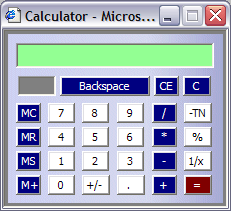
2. Paste Transposed Number
Click in the green field at the top of the calculator, and paste your transposed number into the field.
3. Subtract Transpose Number
Click the -TN button on the calculator to subtract your transpose number. The result will be the actual credit card number.