|
Overview
|   |
|
Overview
| |
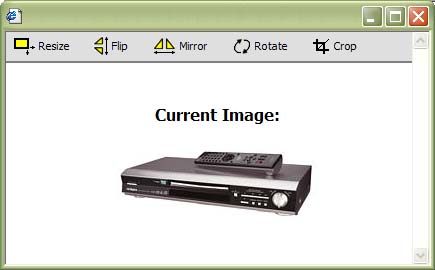
Squirrelcart includes an image editor, to perform simple image manipulations. This will save you the time of working with a graphics program when you just need to perform a simple operation. This feature requires GD v1.6.2 or newer.
Before you can manipulate an image, you must put it in edit mode. You can do this in 2 ways:
Editing an image directly from it's record's table
1. View records
View the records that contain the images you wish to manipulate.
2. Locate image
Navigate through the records, until you see the image (or it's path) listed in the table. If the field for the image is not displayed, click the "Show All Fields" link to make it appear.
3. Click on the image
If the image itself appears, click it to launch the image editor. If the path appears, click the  icon to the left of it to launch the editor.
Editing an image directly from it's record
1. Edit the record
Put the record that contains the image you wish to manipulate into edit mode.
2. Click the image edit link
The image should appear on the left side of it's corresponding image field. Click it to launch the image editor.
Once you have launched the image editor, it will look like this: