|
Default Settings
|   |
|
Default Settings
| |
As you get accustomed to autogenerating your images, you may find that you want to always autogenerate certain images. This can also be useful in ensuring that all your images for a ceratin image field have the same dimensions. In order to set the default settings for an image field, navigate to that field, and click the "edit defaults" link, below the "autogenerate" field. You will see a popup window, that looks like this:
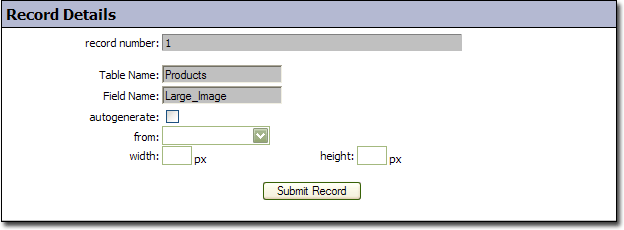
Table Name
- The table that the image field is contained in. This field is read only.
Field Name
- The field that the settings are for. This field is read only.
autogenerate
- This field controls the default state of the "autogenerate" field for the corresponding image field. This setting only works on new records. For example, if this field is checked, and you create a new record, the "autogenerate" field will be automatically checked. After you submit the record, if you were to modify it, the field would not be checked
from
- This field controls the default setting for the "from" field on the corresponding image field
width
- This field controls the default setting for the "width" field on the corresponding image field. It is best to only set the width OR the height, not both.
height
- This field controls the default setting for the "height" field on the corresponding image field. It is best to only set the width OR the height, not both.