|
Image Field Components
|   |
|
Image Field Components
| |
Image fields appear on certain records. Some common records that contain image fields are Products and Categories. Below is an overview of each component of an image field. Please note that some components require GD v1.6.2 or newer, and will not be present if GD is not available. We will note which components that require GD below.
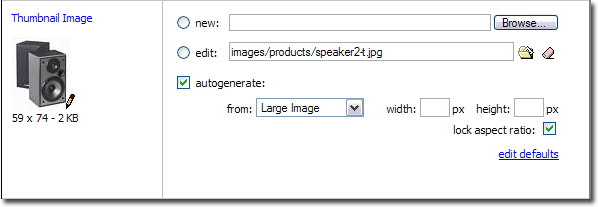
Left Side
Field Name
- this appears at the very top
Image Preview (requires GD)
- If an image has already been assigned for this field, a preview of it will be displayed here.
Image Edit Link (requires GD)
- The image preview is also a link, that will open the image editor in a popup window, if an image has been assigned.
Dimensions (requires GD)
- Actual dimensions of the image, if one has been assigned.
Right Side
The right side of the image field is used to assign an image for this field to the record.
New
- This is used to upload a new image for this field
Edit
- This is used to specify an existing image on your server for this field.
 Image Selecter
- This is used to select an image for this field, from existing images on your server
 Clear Field
- This is used to clear the contents of the edit field.
- This is used to autogenerate images for this field, based on other image fields on this record.