|
Component Overview
|   |
|
Component Overview
| |
In Squirrelcart, it is possible to automatically generate different sized images for a record's image fields, based on an image already assigned to another image field. This saves time that would otherwise be spent resizing images in a graphics program. This feature requires GD v1.6.2 or higher. If you do not see the components described below, then your server does not meet this requirement.
Auto generating of images is done via image fields on database records. Below is a screenshot of the Thumbnail Image field from the Products table, for reference.
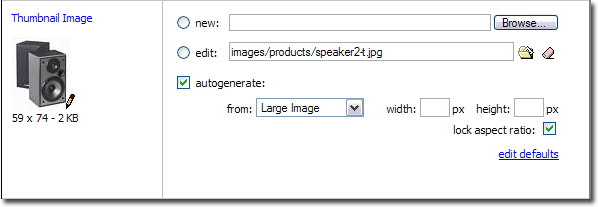
Autogenerate
- check this field to enable autogenerating of this image from another image field
From
- This field controls which image the current image field's image will be generated from.
Width
- The width of the new image in pixels
Height
- The height of the new image in pixels
Lock Aspect Ratio
- When enabled, it contrains the proportions of the autogenerated image, so that they match the source image. When enabled, you can only enter 1 dimension, and the other one will be calculated automatically.
Edit Defaults
-This link will launch the default settings form for autogenerating, for this particular image field.