|
Record Overview
|   |
|
Record Overview
| |
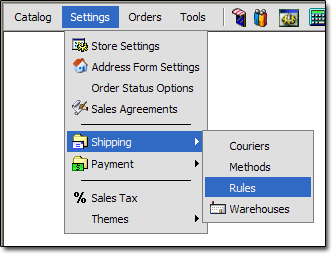
If you are unsure how to work with records, see the "Working With Records" section of the documentation. To get to the Shipping Rule records, click the "Settings > Shipping > Rules" link:
Below is an overview of the fields on a Shipping Method record:
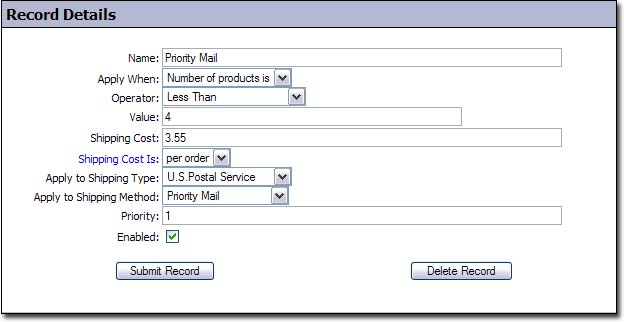
Name
- Name of the shipping rule
Apply When
- 1st part of condition. This tells the cart what we are checking for in the condition. If you think of the condition as a mathematical equation, this is on the left side.
Possible Values:
City is
Country is
Number of products is
Order total is
Privelage level is (not currently used)
State or Province is
Weight total is
Operator
- 2nd part of condition. This tells the cart how to compare the value represented by "Apply When" and the "Value" field. If you think of the condition as a mathematical equation, this is the operator in the middle.
Possible Values:
Less Than
Greater Than
Less Than or Equal to
Greater Than or Equal to
Equal to
Not Equal to
Note: the possible values change, depending on the value of the "Apply When" field.
Value
- 3rd part of condition. This tells the cart what to compare the value represented by "Apply When" with. If you think of the condition as a mathematical equation, this is on the right side. This field changes between a text field and a select input, depending on the value of the "Apply When" field.
Shipping Cost
- This is the amount to charge for shipping if the condition is met.
Shipping Cost Is
- This field controls how the shipping cost will be applied.
Possible Values:
Per Order - if set to per order, the shipping cost will be applied once, for the entire order
Per Item - if set to per item, the shipping cost will be applied once for every item in the order
Apply to Shipping Type
- This field controls the courier that the rate will be offered for
Apply to Shipping Method
- This field controls the shipping method that the rate will be offered for
Priority
- This field controls the priority that the shipping rule will have. The larger the number, the more priority it will have.
Enabled
- This field controls whether or not the rule will be enabled.