|
Product Based Rates
|   |
|
Product Based Rates
| |
Shipping rates can be set on a per product basis. This is useful for altering the shipping rates offered for an item that has to ship a certain way. This is controlled by the Shipping Details section on the product's record. In order to see this section, you must put a product in edit mode.
Field Overview
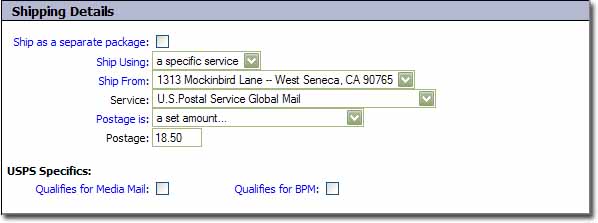
Ship as a separate package
- Squirrelcart does it's best to figure out which items can be shipped in the same package. If you know that an item should ship as a separate package, checking this box will make your shipping rates more accurate.
Ship Using
- This field controls whether this item will ship using a specific service that you specify, or via any services available (via Rules and Real Time Rates)
Possible Values
a specific service - choosing this will make the Service, Postage is, and Postage fields appear.
enabled services (default) - this setting will allow the rates for this item to be derived from a combination of Shipping Rules and Real Time Rates
Ship From (appears when Inventory Control is not enabled)
- When Inventory Control is disabled, this field controls where this item will ship from.
Service (appears when "Ship Using" is set to "a specific services")
- This field is used to specify the service you want to use to ship the product
Postage is (appears when "Ship Using" is set to "a specific services")
- This field controls how the postage will be derived.
Possible Values
a set amount - If set to "a set amount", the field named "Postage" will appear.
calculated using shipping rules (default)
Postage (appears when "Postage is" is set to "a set amount")
- This field is used to specify a set postage amount.
USPS Specifics
Qualifies for Media Mail
- When checked, this item will be included in real time rate lookups for the Media Mail service
Qualifies for BPM
- When checked, this item will be included in real time rate lookups for BPM service (Bound Printed Matter)