|
UPS Tracking
|   |
|
UPS Tracking
| |
UPS Tracking allows you and your customers to track shipments.
Enabling UPS Tracking
To enable UPS Tracking, follow the instructions for enabling Real Time Rates for UPS.
Tracking a Package
1. Launch the Tracking Tool
There are 2 ways to launch the package tracking form:
Method 1 - login on your storefront and click the "UPS Tracking" link in the "Account Options" navigation box. This option is availabe to your customers.
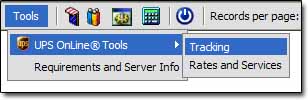
Method 2 - click "Tools > UPS > Tracking" in the admin interface.
2. Track Package
Enter a valid UPS Tracking number in the form, and click submit.