|
Storefront (initial)
|   |
|
Storefront (initial)
| |
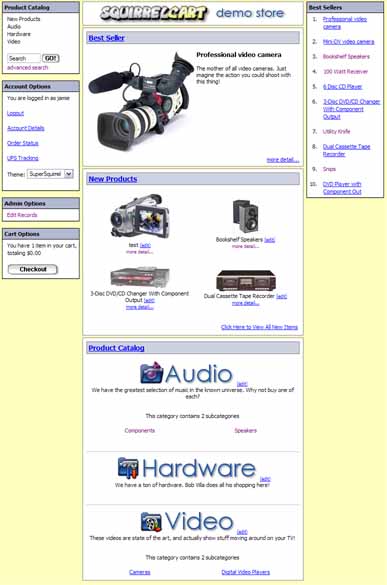
This page describes the templates involved in generating the initial storefront page.
Left Navigation
window.php
This controls the navigation boxes that you see on the left (4) and right (1) of the page. It only controls the actual boxes, not the content within them.
search_simple.php
This controls the search form that appears in the "Product Catalog" nav box on the left of the page.
login.php
This controls the login form, that appears in the "Account Options" nav box on the left of the page. It is not displayed in the image above, because a user is already logged in.
logged_in.php
This controls the content of the "Account Options" nav box on the left of the page, after a user has logged in.
admin_options.php
This controls the content of the "Admin Options" nav box on the left of the page, which appears only when the user logged in is an admin.
cart_options.php
This controls the content of the "Cart Options" nav box on the left of the page, which appears after a customer adds an item to their cart.
Center Content Area
Best Seller Section
best_seller_single.php
This controls the appearance of the "Best Seller", which is the first box in the image above and is displaying a video camera.
New Product Preview Section
new_product_preview_header.php
This controls the appearance of the very top of the "New Products" section, immediately above the first product displayed in that section.
new_product_preview.php
This controls the appearance of a single product within the "New Products". You can use any field that appears on a product record in this template file.
new_product_preview_separator.php
This controls the appearance of the separation between each row of products in the "New Products" section
new_product_preview_footer.php
This controls the appearance of the very bottom of the "New Products" section, immediately below the last product displayed in that section.
Product Catalog Section
show_categories_header.php
This controls the appearance of the very top of the "Product Catalog" section, immediately above the first category displayed in that section.
show_category_detail.php
This controls the appearance of a single category. You can use any field name that appears on a category record in this template.
show_subcategory_detail_header.php
This controls the appearance of the code immediatelly above the first subcategory listing. This template is only used when the category that was displayed above has categories.
show_subcategory_detail.php
This controls a single subcategory. This template is only used when the category that was displayed above has subcategories. You can use any field name that appears on a category record in this template.
show_subcategory_detail_footer.php
This controls the appearance of the code immediatelly below the last subcategory listing. This template is only used when the category that was displayed above has categories.
show_category_detail_seperator.php
This controls the appearance of the code immediately after a category is displayed in detail. It separates each category displayed.
show_categories_footer.php
This controls the appearance of the very bottom of the "Product Catalog" section, immediately below the last category displayed.
Right Navigation
best_sellers_header.php
This controls the very top of the best sellers section, before any best sellers are displayed.
best_sellers.php
This controls the appearance of a single best seller. You can use any field that appears on a product record in this template file.
best_sellers_separator.php
This controls the separation between each best seller displayed.
best_sellers_footer.php
This controls the very bottom of the best sellers section, after the last best seller is displayed.