|
Record Overview
|   |
|
Record Overview
| |
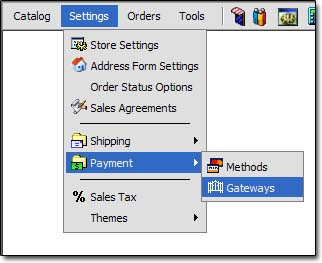
To view the Payment Gateways, use this menu link:
An overview of the Payment Gateway record is below. Please keep in mind that the fields vary depending on the gateway:
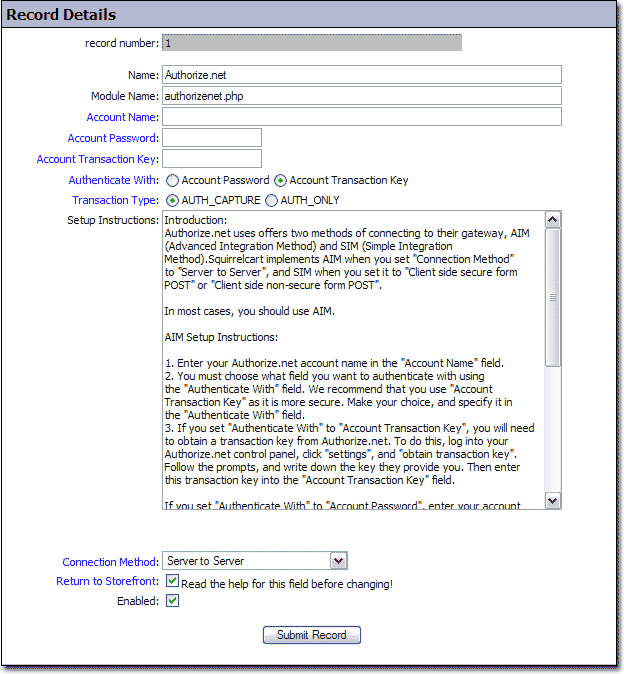
Name
- Name of the payment gateway
Module Name
- Name of the file that controls the payment gateway in Squirrelcart. This should not be changed.
Account Name
- Your account name that is used to access the payment gateway system.
Account Password
- Password associated with the "Account Name"
Account Transaction Key
- This field is only displayed on the Authorize.net payment gateway. It is used instead of a user account, to access the gateway.
Authenticate With
- This field is only displayed on the Authorize.net payment gateway. It is used to determine whether you will use your password, or a transaction key to communicate with Authorize.net.
Transaction Type
- This field controls whether you will authorize the funds, or authorize and capture the funds. This field does not appear on all payment gateway records.
Setup Instructions
- This field contains the instructions for setting up the payment gateway.
Connection Method
- This field controls how Squirrelcart will connect to the gateway. There are 3 possible values. Not all payment gateways support all 3 values.
Possible Values
Server to Server communication
Server at e-commerce site sends all order information to the Payment Gateway in the background via SSL (Secure Socket Layer). Payment Gateway sends information back to e-commerce server indicating the transaction status, and that information is then used to determine what message to issue to the customer. In this method, the customer never sees the URL for the Payment Gateway in their browser. The customer never leaves the site that they ordered from.
Client side secure form POST
Client sends all order information via their browser to a secure page on the payment gateway site. This sometimes can appear the same to the customer as the first method, if the payment gateway supports a quick redirect back to the originating site. All payment information is entered at the e-commerce site. Because of this, this method requires that the e-commerce site have SSL installed.
Client side non-secure form POST
This method is used when the e-commerce site does not have SSL installed. Because of lack of SSL, there is no secure way for the e-commerce site to gather payment information. The order information is sent to via a form POST or a link to a secure URL at the Payment Gateway site. The client is then presented with a form in which they enter their payment information, and complete the order.
Return to Storefront
- This field controls what Squirrelcart will do after sending the payment information to the payment gateway. You should not change this field under normal circumstances. When checked, it indicates that the payment gateway returns information to Squirrelcart to indicate the status of the transaction. When unchecked, it indicates that the gateway does not communicate the status back to the cart. When unchecked, Squirrelcart must assume that the order was placed when it is sent to the gateway.
Enabled
- Checking this field turns the gateway on in Squirrelcart.