|
Shipping Couriers - Record Overview
|   |
|
Shipping Couriers - Record Overview
| |
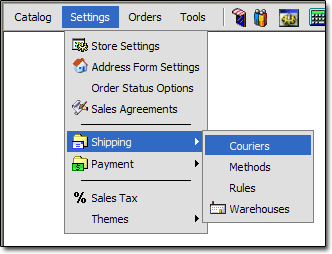
If you are unsure how to work with records, see the "Working With Records" section of the documentation. To get to the Shipping Courier records, click the "Settings > Shipping > Couriers" link:
Below is an overview of the fields on a Shipping Courier record:
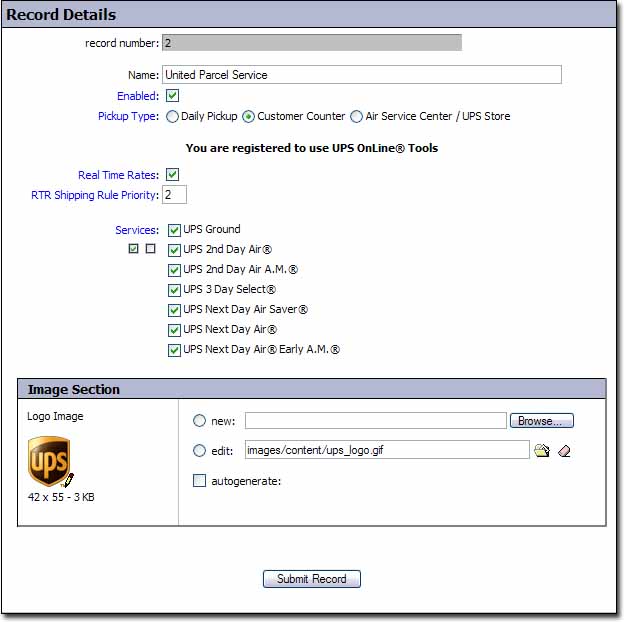
Name
- Name of the courier
Enabled
- When checked, this courier can be used in rates offered to the customer. When unchecked, it cannot.
Pickup Type
- Controls the UPS package pickup type. This field only appears for the UPS courier record.
Real Time Rates
- This field controls whether or not real time rate lookups are enabled for this courier. Not all courier's support real time rates. This field only appears on the ones that do.
RTR Shipping Rule Priority
- This field controls the priority that real time rates will have. This field is only available on courier's that support real time rates.
Services
- This section controls which services are enabled for this particular courier.
Logo Image
- This field controls the image that will appear in your storefront at checkout when rates for this courier are offered. We recommend that you do not change the images of the built in couriers.